You are hunting for a Kajabi alternative because the checkout stopped fitting your deal sizes. Most people switch the whole platform and solve the wrong problem. Here is the fair comparison, plus a third option almost nobody runs the math on.
Keep your course platform and decouple the checkout. Kajabi is strong at courses. The attached checkout knows nothing about contracts, dunning or closer flows.
- Kajabi stays one of the best course platforms, and that is not the problem.
- The checkout adds 0.7% on every recurring charge, installment plans included.
- Switching platforms costs weeks and rarely fixes the checkout layer.
- Third option: leave the course on Kajabi, close big deals on your own cart.
If you sell $49 courses and you like the Kajabi checkout, you can stop reading here.
For everyone else, the honest look at both roads comes first.
Kajabi all-in-one versus a decoupled checkout
| Criterion | Kajabi (everything on one platform) | Course plus your own checkout |
|---|---|---|
| Use case | Courses, communities, email in one | Deals from $5,000 closed on calls |
| Strengths | Polished course experience, everything connected | Contracts, signature, dunning, closer flow |
| Limitations | Standard checkout, no contract logic | Two tools instead of one |
| Cost model | Plan fee plus processing fees | Fixed monthly fee, 0% revenue share |
What Kajabi genuinely does well
Let's start fair. Kajabi is one of the most complete course platforms on the market. Courses, community spaces, websites and email all mesh cleanly.
Anyone who has ever glued three tools together with Zapier knows the value. One login, one system, no sync errors. That saves real hours every week.
The member experience is strong too. Your clients find their way around without a walkthrough video. That only holds while your business model fits the checkout bolted onto it.
Kajabi: An all-in-one course platform for online courses, communities, websites and email marketing with a standard checkout attached. Payments run through Kajabi Payments, which is built on Stripe, or through PayPal. It is designed for self-serve products, not for sales-led high-ticket closes with contracts and installment plans.
Where the plan limits start to bite
The plans read simple enough. Basic is $179 a month, Growth $249, Pro $499. Paying annually drops that to $143, $199 and $399.
At your deal volume the subscription itself is pocket change. The expensive part sits a layer deeper, which we get to in a minute.
The limits are the sharper edge. Basic covers 5 products and 2,500 contacts, Growth 50 products and 25,000 contacts. Only Pro lifts the product cap entirely.
This bites the moment your list outgrows the plan you picked. A funnel with 30,000 contacts pushes you to Pro no matter how few products you sell.
There is a smaller entry plan below all that. Kajabi calls it Starter, and it covers 1 product and 250 contacts.
For a real offer portfolio that is a demo, not a working tool. Pro has a ceiling too, at 100,000 contacts. Plenty for most people, a wall for a big list.
What speaks for Kajabi
- Courses, community and email in one system, with no tool chaos.
- Polished member experience that clients operate without explanation.
- A full month of free trial to test it without risk.
What speaks against it
- Product and contact caps on every plan below Pro.
- Checkout without contracts, e-signature or dunning stages.
- Third-party payment providers cost 0.5% to 5% of revenue.
Kajabi Payments fees: the layer nobody adds up
Kajabi Payments runs on Stripe underneath and settles in USD. So far, so normal.
The official US fee sheet reads like this. Cards and digital wallets cost 2.9% plus $0.30 on Starter and Basic. Growth drops to 2.8% and Pro to 2.7%.
International cards add another 1.5%. Fine. Now comes the annoying part.
Recurring charges carry an extra 0.7% per transaction. That covers subscriptions and, explicitly, payment plans.
So a $24,000 deal split into 12 installments pays that surcharge twelve times. Roughly $168 on that one deal, purely for choosing installments. Exactly the payment model high-ticket runs on.
Then the side dishes. Disputes cost $15 each, currency conversion adds 1%, invoicing adds 0.4% per invoice, sales tax calculation runs $0.15 per transaction.
One line item is missing from almost every comparison. Instant payouts cost 1.5% of the payout amount, with a $0.50 minimum. Pull your money early and you pay for the speed.
Each piece is small on its own. Together they form a cost block nobody totals in advance. Skip that math and you find it in your year-end books instead.
Third-party payment providers cost extra
Prefer connecting your own Stripe account directly? You can, and it costs you. Kajabi charges a platform revenue fee on third-party payment providers.
The scale runs 5% on Starter, 2% on Basic, 1% on Growth and 0.5% on Pro. Only PayPal and Kajabi Payments are exempt.
That is not malice, it is a well-known platform model. You do pay twice though. First the subscription, then a slice of revenue.
The irony is that Stripe sits underneath Kajabi Payments anyway. Bring your own Stripe account and the scale still applies.
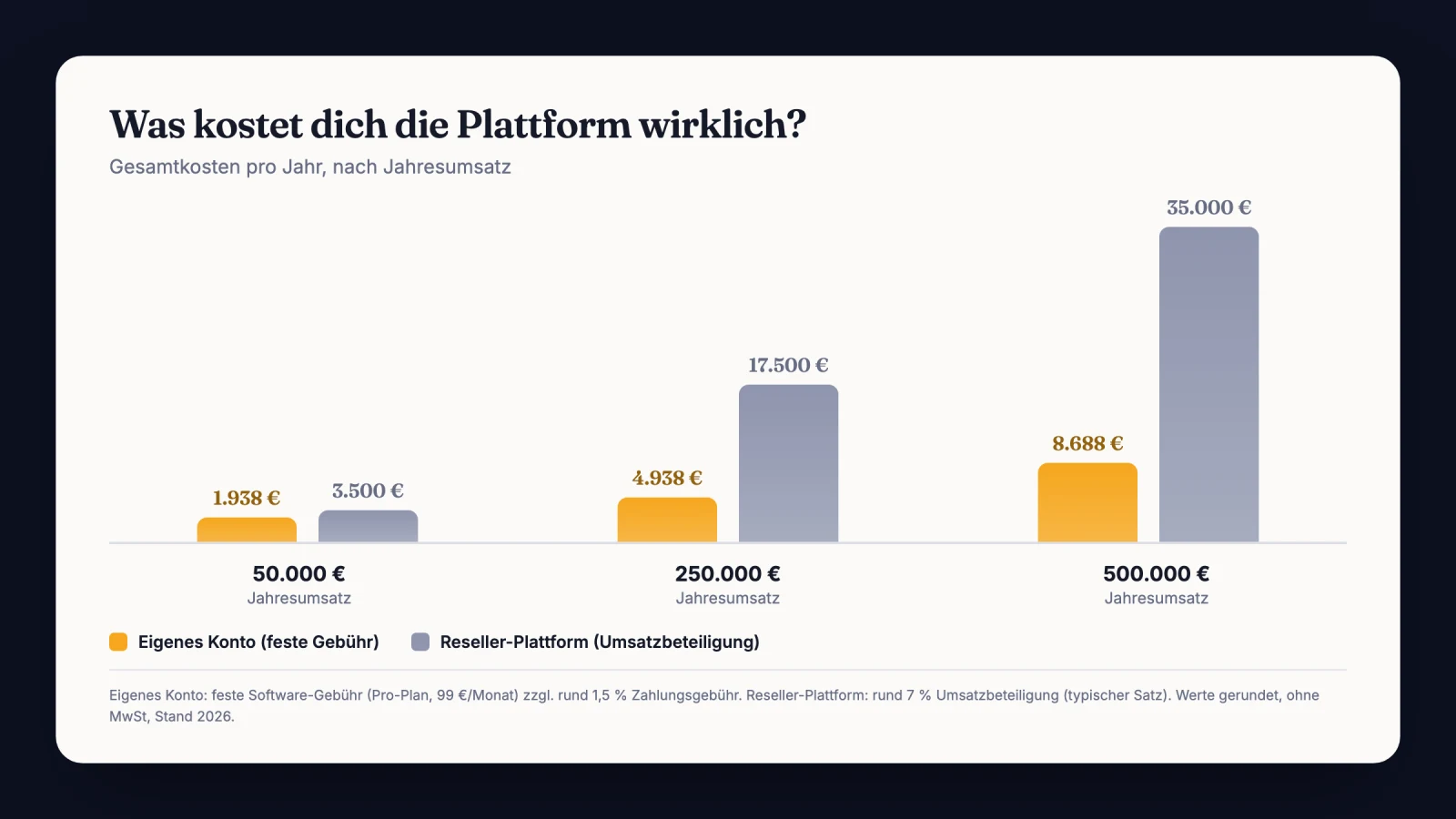
This lands hard the month a single month brings $300,000 in contract volume. Even 0.5% is $1,500 right there. For a fee that simply does not exist on your own checkout.
The expensive mistake
Comparing only the monthly platform price and ignoring the transaction layer. At high-ticket your margin is decided by recurring surcharges, revenue fees and bounced installments, not by a $179 subscription. Miss that and you overpay by a five-figure amount per year.
Payment methods: strong on cards, thin on the big-ticket ones
Let's look at what your buyer can actually pick. Kajabi Payments handles cards, Apple Pay and Google Pay. Klarna and Afterpay cover buy now pay later.
Both BNPL options are expensive at size. Afterpay costs 6% plus $0.30, Klarna 5.99% plus $0.30. On a $10,000 close that is roughly $600 gone.
Here Kajabi wins a round, and it deserves credit. ACH direct debit costs 0.80% capped at $5.00, which is excellent on a large amount.
The catch is where ACH lives. It runs on invoice-based payments, and invoicing adds 0.4% on top. Bank verification costs $1.50 per attempt and a failed payment costs $4.00.
Honestly. A $15,000 deal rarely gets paid by credit card in one shot. It runs on installments, a bank debit or outside financing.
That checkout was not built for the conversation around it. If your buyer misses the method he expects, you lose the close at the cart instead of at the offer.
How to structure installment models without leaning on a single card is in our piece on offering payment plans as a coach.
Sales tax: automated, but the liability stays yours
Kajabi can calculate sales tax automatically and generate receipts per purchase. For a US seller crossing economic nexus thresholds, that is genuinely useful.
The important part sits underneath it. Kajabi is not a merchant of record, so you remain the seller of record.
Registration, filing and remittance stay entirely with you. The platform calculates, you are liable.
Both helpers cost extra, at the rates listed above. You pay for tax convenience and still carry the responsibility. That is fine, you just need to know it going in.
The blind spot: contracts, signature, dunning
Now the core issue. Neither the pricing page nor the help center lists an e-signature or contract feature. No waiver flow, no B2B agreement documentation.
On a $99 product none of that matters. On a $20,000 engagement it is negligent. Without a signed agreement you have nothing to show at a chargeback.
Dunning is the same story. Kajabi documents no dunning stages and no collections handoff for bounced installments. When installment 4 of 12 fails, nobody chases it automatically.
And yes, that 0.7% recurring fee applies to every one of those installments. So you pay a surcharge on a payment model the platform does not protect. What a proper escalation looks like is in our guide to automating your dunning process.
The trap We once ran an $18,000 deal across 12 installments through a plain platform checkout. After installment 5 the client's card expired. No signed contract, no dunning stage, just an error in a backend nobody opened for three weeks.
The fix Every close now runs through a checkout with e-signature and automatic dunning. A bounced installment triggers the first notice without me touching anything. The $10,500 left open back then would have collected itself.
The real Kajabi alternatives, ranked honestly
You want names. Here they are, sorted in about a minute.
Teachable and Thinkific are the long-standing classics. Both do courses well and both attach a standard checkout. Solid platforms, same structural gap.
Podia and Skool come at it from the community angle. Skool in particular has pulled a lot of coaches over on community alone. The cart underneath is still a cart.
Then there are the reseller marketplaces. They sell in your name and remit the tax for you. Convenient, and it costs a share of every dollar you make.
Every one of these is a good pick for the right business. They just all leave the same problem untouched.
Look closely at what actually bothers you. The course area? Rarely.
It is usually cost and checkout. That is exactly the layer you carry with you when you migrate.
Because the next course platform bolts on its own standard checkout. No live price control on a call, no contracts, no dunning.
Two weeks of migration later the same cart is attached, with a different logo on it. This is where most people get burned, because they confuse the category with the cart.
"Course platform" and "high-ticket checkout" are two different jobs. No tool is excellent at both.
Myth
A Kajabi alternative has to be another all-in-one platform, otherwise it turns into chaos.
Reality
Splitting course from cart is not chaos, it is division of labor. The course platform delivers content and the checkout closes deals. Large sales organizations work exactly this way, because a specialist tool per job is more reliable than one generalist.
The third way: keep the course, decouple the checkout
Here is what the split looks like in practice. Your courses, community and emails stay where they are. On Kajabi, if you are happy there.
In front of that you put your own high-ticket checkout. Your closer sends one link during the sales call. Behind it he steers price, payment method and split live, and the client sees every change instantly.
The close runs with e-signature, timestamp and a contract PDF. Installments are called Split at CloserCart and run embedded through your own Stripe account. How the signature holds up legally is covered in signing contracts digitally.
The money lands in your own accounts with no revenue share. How that connection works is on the page about connecting your own payment providers.
A bounced installment triggers automatic dunning. If your community runs on Circle, access gets granted after the first payment. Kajabi course access you keep handing out exactly as before.
Once you have watched it run on a live call, it clicks. At high-ticket the checkout is not a form, it is part of your sales floor.
Insider tip
I always decouple the most expensive offer first. The flagship program moves to its own checkout and every self-serve course stays untouched on the platform. That way you test the new flow on 5 to 10 real deals before migrating anything.
Most of the time it stays exactly at that split. Not out of laziness, but because both tools then do what they were built for.
The options at a glance
Quick pause before we go on. Here are the realistic roads side by side.
Kajabi alternatives at a glance
| Option | Category | Checkout depth | For high-ticket |
|---|---|---|---|
| Keep Kajabi | All-in-one course platform | Standard checkout | Limited |
| Teachable, Thinkific | Course platform | Standard checkout | Limited |
| Podia, Skool | Course and community | Standard checkout | Limited |
| Course plus own checkout | Decoupled | Contracts, splits, dunning | Very strong |
How the checkout providers stack up against each other is covered in the guide to checkout platforms. For the cart-side angle, our piece on ThriveCart alternatives for high-ticket is worth a read.
How a stacked fee layer cost me an evening
Quick detour into practice. Late last year I sat with a client over his year-end numbers. Coaching business, genuinely strong months, the best one over $400,000 in contract volume.
His question sounded harmless. Why did the checkout line in his books never match his estimate? We sorted receipts for a whole evening.
The answer was banal and irritating at once. The platform subscription was one invoice. Processing fees were another, and the recurring surcharge on his payment plans a third.
Nothing showed up on a single statement together. And the surcharge had quietly grown all year, because more of his deals moved to installments.
He had never seen the real checkout layer as its own cost block. Once we pulled it together, the annual figure sat well above what a complete own setup would have cost.
No scandal, no hidden rip-off. Just a pricing model never designed for his deal sizes. At self-serve prices that same invoice would have looked completely unremarkable.
He kept the course area, by the way. Only the cart got replaced. Not pretty, but a good lesson.
Forget the course platform feature comparison
The standard advice for "Kajabi alternative" is to compare course features. Video player, quizzes, community modules. I think that is the wrong metric entirely.
Your course player earns nothing. It delivers what sales already sold. A slightly nicer quiz module moves your monthly revenue by exactly zero dollars.
The better metric is net payout per closed deal. So contract value minus fees, minus bounced installments nobody ever chased. That number moves through the checkout layer, not the course features.
So judge course platforms on learning experience and the checkout on closing reliability. Two jobs, two scorecards. Mix both into one spreadsheet and you end up mediocre at both.
What I would do in the first 7 days
No mammoth project. One focused week is enough to test the split without migrating anything.
- Pull one quarter of Kajabi costs together: plan, processing fees, recurring surcharges.
- Decide which offer above $5,000 moves to your own checkout first.
- Connect your own Stripe account and run one test payment end to end.
- Load your service agreement with e-signature and click through it yourself.
- Set up Split options and dunning stages for that one offer.
- Test the handoff: payment received, course access delivered to the client.
- Close the first real deal on the new link during a sales call.
Your Kajabi account stays untouched all week. That is the whole point. You are testing the cart, not the course platform.
Before you cancel or migrate anything
- Real annual cost of the checkout layer calculated.
- At least one real deal closed through the decoupled checkout.
- Contract, signature and dunning stages tested end to end.
- Handoff from checkout to course platform run through once completely.
- Only then decide whether the Kajabi plan changes or stays.
Sources
- Kajabi Pricing (official)
- Kajabi Payments Fees: United States (Kajabi Help Center)
- Kajabi Payments Processing Fees (Kajabi Help Center)
- Getting Started with Kajabi Payments: United States (Kajabi Help Center)
- How to Enable Afterpay on Kajabi Payments Offers (Kajabi Help Center)
- Kajabi Payments Overview (Kajabi Help Center)
Frequently asked questions about Kajabi alternatives
Is Kajabi a good fit for high-ticket coaching?
Partly: the course and community side is excellent at any price point. The attached checkout is built for self-serve buying, with no contract, no e-signature and no dunning stages. For deals closed on a sales call, that gap shows up on the first bounced installment.
What does Kajabi really cost per month?
Basic is $179, Growth $249 and Pro $499 per month, or $143, $199 and $399 billed annually. On top come processing fees from 2.9% plus $0.30 per card payment, plus 0.7% on every recurring charge. Third-party payment providers cost another 0.5% to 5%.
Does Kajabi handle my sales tax?
No, Kajabi is not a merchant of record. It calculates sales tax automatically and issues receipts, but you remain the seller of record. Registration, filing and remittance stay with you, and the calculation costs $0.15 per transaction.
Do I have to cancel Kajabi to use CloserCart?
No, and that is exactly the point of decoupling. Your courses and communities stay on Kajabi, while the high-ticket close runs through your own checkout with contract, signature and Split. Course access you keep granting the same way you do today.
Does Kajabi have contract signing or dunning?
No, both are missing. Neither the pricing page nor the help center lists a signature or contract feature, and there is no waiver flow either. For bounced installments Kajabi documents no dunning stages and no collections handoff.
Connect your own payment providers without giving up Kajabi
CloserCart connects Stripe, PayPal, AffiliCon or Ablefy directly and closes high-ticket deals with contract, signature and Split. From €49 a month, 0% revenue share.
Start now for €1 14 days for €1. Cancel monthly. 0% revenue share.